

Latency as Design Language – AI/UX Beyond the Screen
I recently had to call a customer care number regarding a demo software. The call felt usual — an Indian lady answering with background sound of other executives talking. How did I know she was Indian? By her name and her accent. During the call, when I asked something which was very contextual to me, she would try to find the right solution by typing on her keyboard. It seemed like a mechanical keyboard, all the keys making the tok-tok-tok noise. After a few times of this happening, I realized that all those times she was typing to find my specific request, she always took about 4 seconds. Initially it was fine — of course she would need a few seconds to find what I needed. But as the call grew longer, her typing speed remained the same, and I started feeling frustrated. I could feel that she sensed my frustration, from the change in the way she talked, but she did not increase her typing speed. Always 4 seconds. Finally she sensed that my frustration was at its peak and connected me with a human executive.
I wasn’t actually a regular customer—I was conducting a UX audit of their voice agent setup. I already knew that she was not human. That the background noise was all simulated. Even the keyboard sounds were not real. Who uses mechanical keyboards nowadays? One thing did feel a little unnatural. Why did she always have the same typing speed? Not one bit slow, not one bit fast?
A little background will help explain this. When this artificial AI voice was first used, it was just a pure human-like voice. There was no background noise. While it spoke, listeners would be slightly weirded out. Normal call centers with real humans always have background noise from other callers sitting nearby. With just one singular voice, it sounded like the executive was talking from a sound-insulated studio. When this call executive paused, the sound output went to zero. In the analog world, with real people talking, there is always some sound of breath, or clothes, or chair creaking, and so on. This absolute silence made people think their call had dropped, increasing their anxiety that they might have to do the whole explaining again, in another call. They would start asking, “Are you there? Hello… are you there?”
Ambient noise, specifically “comfort noise,” was added in to solve this problem. The keyboard typing was a later addition, an improvement, to make the caller feel that the executive had not gone and taken a coffee break. That while they were waiting, somebody was actually trying to solve their problem.
But here this question arises: how much time would an AI need to find the right answer? It is not a typical human with a limited memory, having to go into folders and files, or open different pages and navigate. And would it always need the exact same 4 seconds to find your solution?
These AI systems run mostly on cloud computing, which is unpredictable, prone to network congestion, and might have some latency. As the budget increases and more money is pumped in, it is possible to minimize this latency as much as one would like. In an AI system like Gemini, ChatGPT, or Claude, where the end user knows that the person answering back is not human but an AI, it makes sense to keep this latency at the limit of that technical constraint. But what happens when one wants to simulate actual human beings on the other end — talking in real human accents, with the same limitations as the caller has? It would feel very unreal if a human telecaller knew my address, my account number, or my details in absolute verbatim, with no need to click on the keyboard or go down a few levels in a navigation menu. This is where the use case for induced latency comes in.
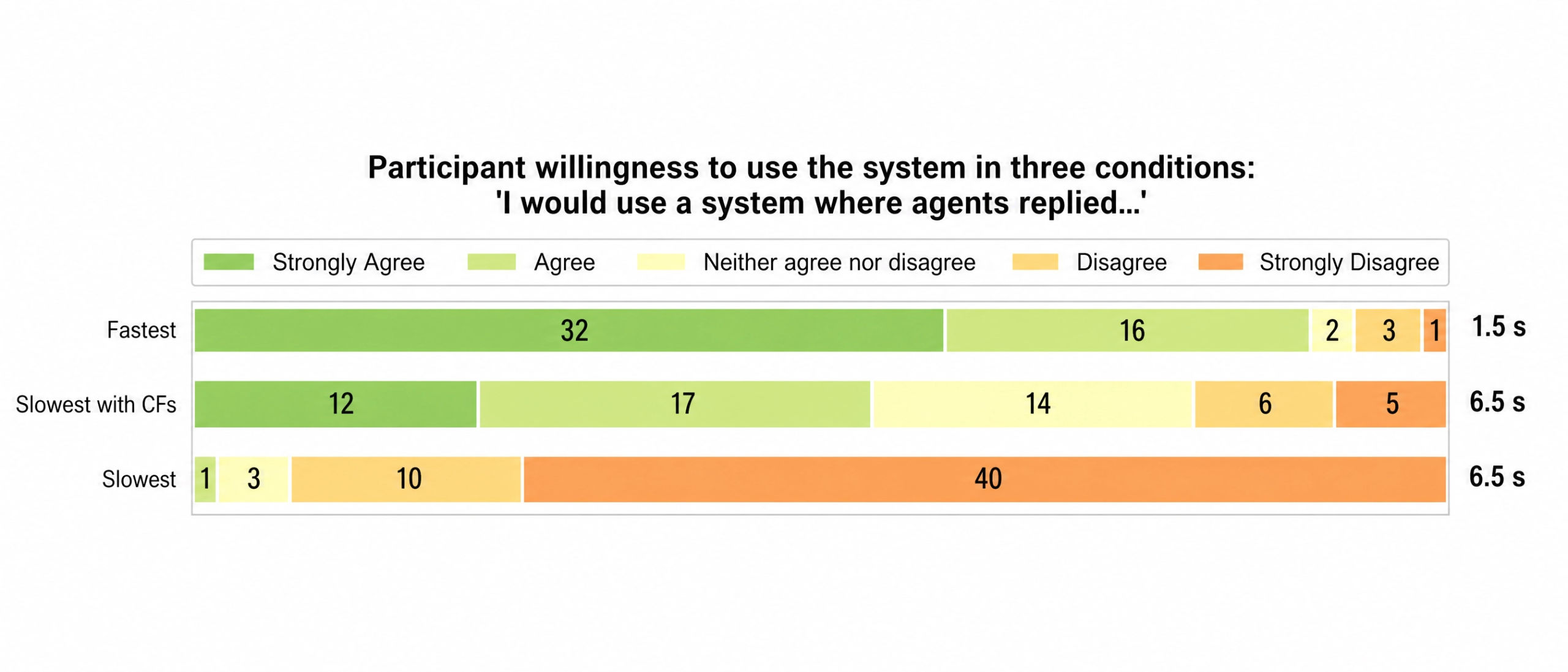
Traditionally, latency is something technology has always tried to minimize. Helped by Moore’s Law and faster and faster machines, delayed gratification was almost never in a company’s mission statement. It was always as fast as possible. This paper, published last year in July, tried to find the optimum latency beyond which user experience goes downhill. And that number was 4 seconds. However, this number has to be taken with this realization: as people start using these systems more and more, a few years down the line, this number may become 3 or 2.
We can never distinguish genuine computation time from designed waiting. ChatGPT answers text-based prompts instantly; Claude takes its time — “cogitating,” “digesting,” “assimilating.” Maybe there’s a real technical reason. Maybe there isn’t. From where I’m sitting, I can’t tell the difference — and neither can you.
So would a latency of about 3.9s be okay? Maybe yes, maybe not. The question is why the delay is there in the first place. Is it there intentionally to push people to upgrade? Then data on how that delay is making people drop off or upgrade would have to be analysed. If the delay is just to make it look real, aided by the keyboard sounds I heard, there has to be some way the 4-second period changes during my conversation. The longer the conversation goes on, that delay should decrease. Nowadays most AI agents have access to Multimodal Emotion Recognition. If it senses the caller is getting frustrated, maybe the delay should decrease. The typing speed should also increase. The induced latency then becomes contextual, adapting. The filler doesn’t have to be just typing sounds, which are one of the simplest options. It could be other Conversational Fillers (CF). Right now I know of no AI system which provides prebuilt API calls for CF. This would need some custom development. These custom fillers could be typical human fillers, like, “hmmm..”, or “getting right on it”, or even other more personal ones in this case when the system is of a personal assistant.
With all this talk about virtual humans faking being real, the ethical question of whether the AI voice agent should identify itself as non-real comes into the picture. That is a topic for a future post, but definitely worth exploring if you are working on a Voice AI system. Just look at this graph from the Mykola paper.
The cast of this Identity Theatre
The ambient office noise is the set.
The keyboard is the prop.
The voice/accent/name is the actor, based on the call executive persona.
And the AI itself is performing a role.
Theatre Critic
The AI agent has successfully simulated the signals of a human:
accent + office + keyboard + pause
but hasn’t fully simulated the behavioural logic behind those signals.
The set is convincing. The props are convincing. The actor sounds convincing. But occasionally, the actor forgets to improvise.
All in all, I give 3.5 stars.
{If you would like to get a UX audit of your voice AI service, feel free to contact anand[at]rega.in}


Began reading, and of course it was highly interesting, to say the least. At present, because of tutoring the boy, AI is very relevant, schools are pushing it down our throats. You kind of wrote a detective thriller here. I am keeping it for Dwaipayan to read, he’ll be interested.
thanks Sush. Glad that it was enjoyable to read. I deliberately kept it in a conversational style to let anyone enjoy it, rather than just professionals working in this field.